UCO
Secure™ from UCO Bank is a safe and secure method for Online Banking and Net Banking
Payments. It protects one from Internet frauds such as login-id / password
theft by phishing / key logging etc.
When one will be enrolled for UCO Secure™, the Activation PIN will be sent to one’s mobile number registered with UCO Bank. After getting activation log in the UCO e-banking. The following messages will be shown after log in:
When one will be enrolled for UCO Secure™, the Activation PIN will be sent to one’s mobile number registered with UCO Bank. After getting activation log in the UCO e-banking. The following messages will be shown after log in:
- If you have the Activation
PIN select the YES option below. Otherwise, select NO.
Activate UCO Secure™ now?


You will need the Activation PIN to activate UCO Secure™ after download.
If you have not received the Activation PIN by SMS from UCO Bank, please contact UCO Secure™ Support at 1800 345 3337 or ucosecure@ucobank.co.in.
Steps to activate UCO Secure:
Step
1: Download UCO Secure™ Installer by clicking on the link and save it to your
computer.

Step
2. Run the Installer to install UCO Secure on your Machine.

3:
Start UCO Secure™ by clicking on the UCO Secure Icon on your Desktop.

4:
Enter your Internet Banking User ID


5:
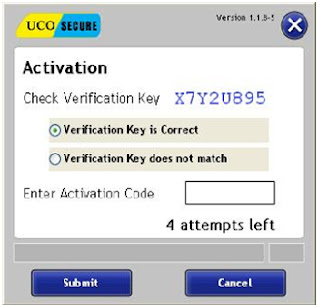
Check that the Verification Key is matching and enter the Activation Code

6.
You will be asked the Security Question. Specify the Security Answer, set your
Device PIN and click Submit.


7: UCO Secure™ launches the UCO Bank Retail
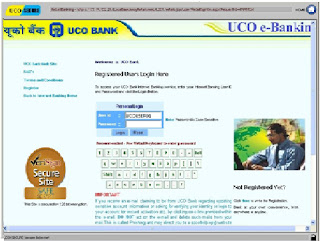
and Corporate Internet Banking login page in a secure desktop mode. Login to
your account and continue Internet Banking.

If
you are unable to download or install UCO Secure™, please try this
link to
download and extract the ZIPPED version of UCO Secure.
If
you are still unable to download or activate UCO Secure™, contact UCO Secure
Support at 1800 345 3337 orucosecure@ucobank.co.in and try logging in again if
the problem is resolved.

